GenieATM DDoS Mitigation
GenieATM provides network operators the functionality to analyze traffic and mitigate DDoS attacks. It allows users to monitor and analyze network traffic, and generate traffic reports.
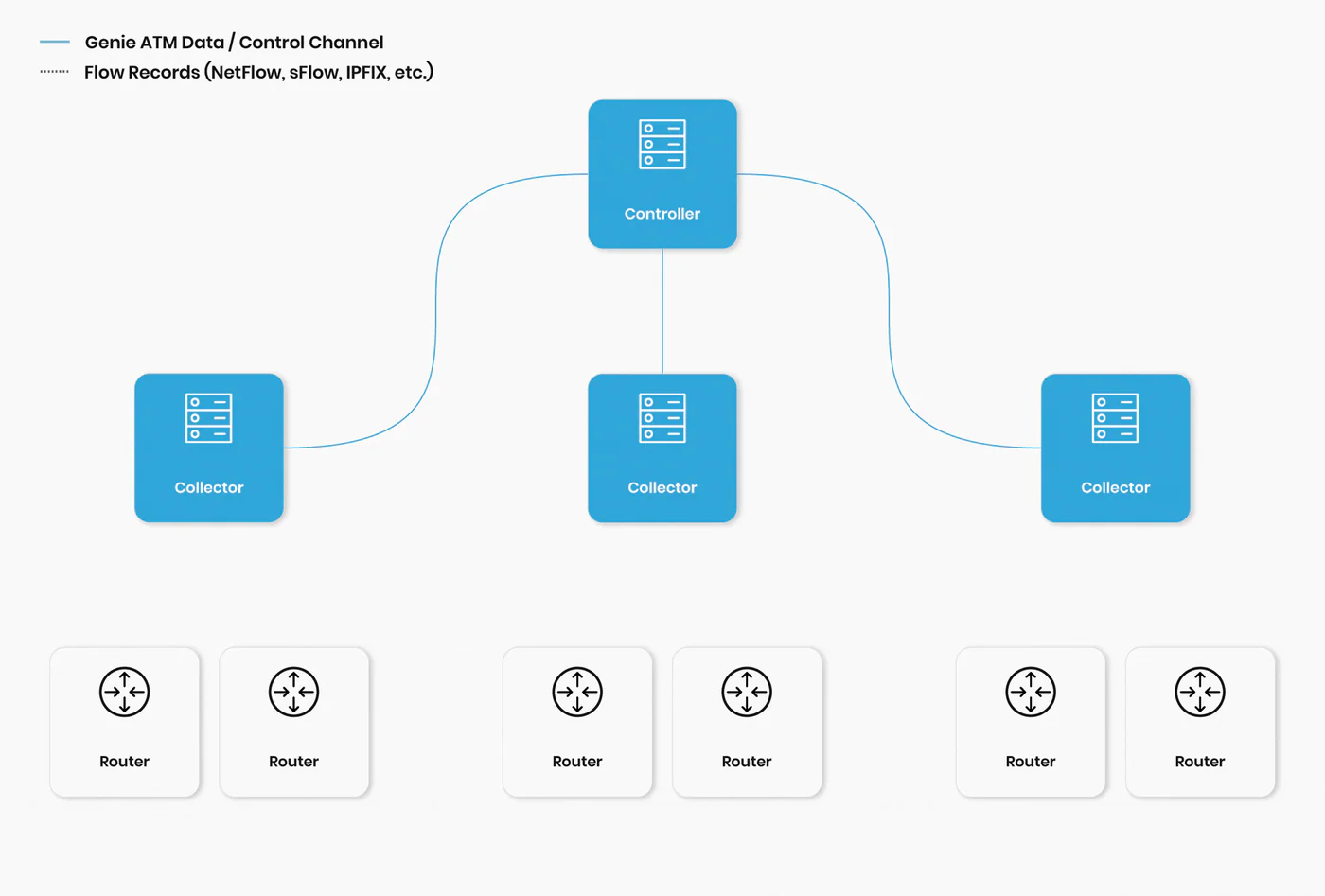
System overview
Components: Controller, Collector, Network Traffic Modeling.
- >Collector:
- >Managing configuration and generating reports.
- >Connects to BGP (Border Gateway Protocol) routers to collect flow records.
- >Controller:
- >Aggregates collected data into a database; uses CLI for configuration.
- >Collecting flows and sending classified data to controller.
- >As a controller, takes data from the collector and aggregates it into a database.
Steps
- >Licensing and verification: ensure controller and collector licenses are enabled.
- >IP configuration:
- >Assign IP addresses to interfaces.
- >Create SNMP community string (
snmp-server community 'string' RO or RW). - >Configure IP route (
ip route 0.0.0.0 0.0.0.0 192.168.x.x 0). - >Set hostname if required.
- >Configure management IP (
module local ip 192.168.x.x).
- >Additional configuration:
- >Set IP addresses for DNS (
ip name-server 192.168.x.x) and NTP server (ntp server 192.168.x.x). - >Configure controller (
remote controller ip 192.168.x.x priority 1) and its ID. - >Configure collector with its ID and permissions.
- >Set IP addresses for DNS (
- >Database configuration:
- >Use internal storage (
db use internal). - >Initialize database (
run db init internet). - >Save configurations and reload system (
write configandreload now).
- >Use internal storage (
Configuration overview
Login portal URLs:
- >GA dashboard:
http://192.168.180.6/default# - >GA admin:
http://192.168.180.6:8443
Configuring controller:
- >Navigate:
System admin > Analyzer > Controller. - >Verify SNMP settings using SNMPWALK.
Configuring collector:
- >Navigate:
System admin > Analyzer > Controller. - >Ensure BGP routers are configured before adding BGP connections.
Configuring router:
- >Navigate:
System admin > Device > Router. - >Provide router name, select collector, and configure SNMP and NetFlow.
Configuring interfaces:
- >Add router interfaces using SNMP discovery and assign boundaries.
Configuring subnetwork:
- >Navigate:
System admin > Network > Sub-Network. - >Fill in sub-network details and set default configurations.
Anomaly detection and notification
Configuration:
- >Report: define network scope and add AS details.
- >Boundaries: configure major and secondary boundaries.
- >Top-N Report: aggregate traffic data for anomaly detection.
Anomaly detection:
- >Set baseline thresholds.
- >Enable host-based and prefix-based DDoS anomaly detection.
Anomaly notification:
- >Enable email notifications and configure recipients.
Adding routers:
- >Navigate:
System admin > Analyzer > Collector. - >Add collector IP as BGP identifier and configure routers.
Configuring mitigation
Configuring BGP peer:
- >Add BGP peer (redirection router) between mitigation device and GenieATM.
- >Enter router details and verify AS numbers.
Configuring mitigation device:
- >Add and configure third-party mitigation devices (e.g., F5).
Configuring SNMP:
- >Ensure SNMP settings are configured on mitigation devices.
- >Verify using SNMPWALK.
Redirection routers:
- >Add injection router to handle cleaned traffic from mitigation device.
Mitigation fail-safe:
- >Enable device status checks to ensure mitigation devices are operational.
Existing zones:
- >Update virtual server configurations using SNMP polling.
Configuring protection profile:
- >Edit or create protection profiles for DDoS detection.
- >Configure attack vectors, thresholds, and detection settings.
Configuring policy template:
- >Create policies for mitigation with specific protection profiles.
- >Define criteria to trigger mitigation based on severity and attack type.
Protected zone:
- >Configure auto-mitigation settings and define network scope.
DDoS detection and mitigation mechanisms
Fast detection:
- >Per router, per host-based detection.
- >Triggers anomaly if traffic exceeds baseline value.
Accumulative detection:
- >Analyzes total attack traffic across multiple routes.
- >Detects anomalies for all layer 3, 4, 7, and DNS/SIP attacks.
Mitigation process:
- >Redirects attack traffic to F5 BIG-IP for cleaning.
- >Re-injects cleaned traffic back to customer network.
Notes:
- >SNMPWALK: used to verify SNMP configurations.
- >Baseline thresholds: customizable for different types of traffic anomalies.
- >Email notifications: ensure timely alerts for detected anomalies.
The connects to BGP routers to gather flow records, and the aggregates them into a database. Cleaned attack traffic is sent back by a router.