SSL Offloading on F5 BIG-IP
f5bigipSSLcertificatesTLS
- >To control SSL traffic that is destined for BIG-IP virtual servers.
- >The SSL profile adds the ability to maintain secure connections between the client system and the BIG-IP system, and between the BIG-IP system and a target web server.
Self-signed certificate
A self-signed certificate is signed by the system's own private key.
- >BIG-IP software includes a self-signed SSL certificate named default, which can be used to terminate SSL traffic.
- >The Configuration utility page can be used to renew existing self-signed certificates or create additional self-signed certificates.
Process:
- >Log in to the Configuration utility.
- >Go to the System > Certificate Management > Traffic Certificate Management > SSL Certificate List page.
- >Select Create.
- >Enter a name for the certificate.
- >In the Issuer list, select Self.
- >Configure the Common Name setting and the other certificate settings.
- >Under Key Properties, configure an appropriate Key Type and Size.
- >Select Finished.
- >Associate the SSL certificate with the appropriate SSL profile.
CA certificate
A CA certificate is signed by a CA's private key. Using a CA certificate allows us to replace the self-signed certificate on each BIG-IP system with a trusted CA certificate, which is a certificate signed by a third party.
- >Authenticating BIG-IP systems using trusted CA certificates is more secure than using self-signed certificates.
- >The Configuration utility provides a set of certificate management pages that allow us to create certificate signing requests (CSRs). The requests can then be sent to the CA for a signature.
Process:
- >Log in to the Configuration utility.
- >Go to the System > Certificate Management > Traffic Certificate Management > SSL Certificate List page.
- >Select Create.
- >Enter a unique Name for the new SSL certificate and key.
- >In the Issuer list, select Certificate Authority.
- >Enter the required Common Name. This value is embedded in the certificate for name-based authentication purposes, and is typically the fully qualified domain name (FQDN) of the server (for example,
www.domain.com). - >Configure other certificate settings.
- >Under Key Properties, configure an appropriate Key Type and Size.
- >Optional: if the BIG-IP system supports the FIPS hardware security module (HSM), specify the key type (FIPS or Normal).
- >Select Finished.
- >To download the request into a file on the system, complete one of the following tasks:
- >Copy the certificate from the Request Text box.
- >Select the button in the Request File box.
- >Select Finished.
| SSL Offloading | 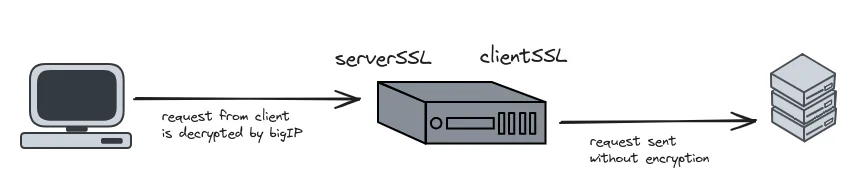 Expand |
|---|---|
| SSL Bridging |  Expand |
Offload or bridge3 blanks
In SSL the load balancer decrypts the client traffic and forwards it to the server in plaintext. In SSL it decrypts, inspects, then to the server.
try it before revealing