Cisco Packet Tracer Basics
networkCiscopacket tracerlabCCNA
1. Building a simple network
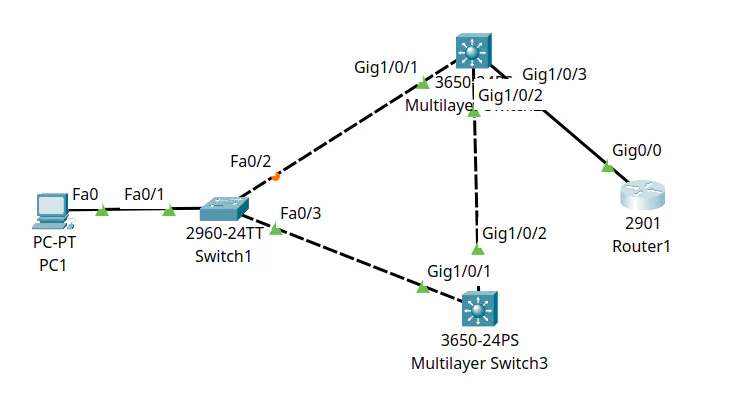
- >Drag and drop a PC, an access layer switch, core switches, and a router.
- >Connect them using the "Automatically connect" option ⚡️.
- >Click on multilayered switches and drag and drop the power supply.
- >Configuring the router using the CLI:
- >Enable privilege level 15 mode using the command:
enable 15 - >Turn on configuration mode on the current terminal with the command:
configure terminal - >Go to a specific interface using the command:
interface $INTERFACE, e.g.interface gig 0/0 - >Activate the interface using the command
no shutdown
- >Enable privilege level 15 mode using the command:
Expand
2. Getting the physical view
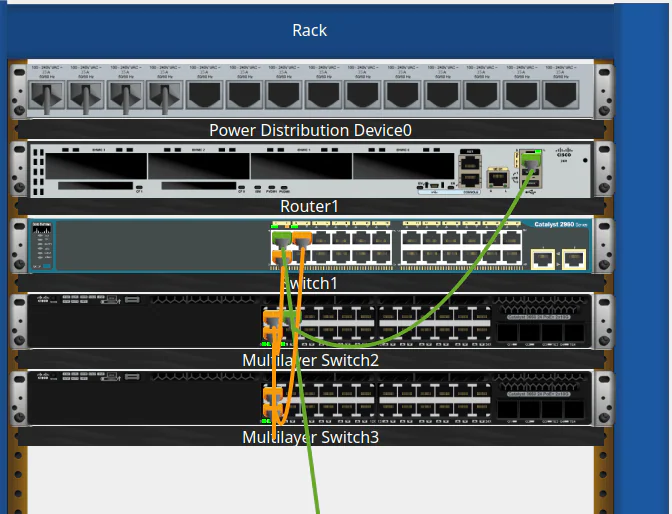
- >Click on the physical tab.
- >Click on the compass and select the view you want, then select "jump to selected location", or click on the home icon to access the rack.
Expand
3. Simulating traffic
- >Assign an IP address to the interface of the router using the command:
ip address $IP_ADDRESS $NETMASK.We can check the interfaces using the command
show ip interface brief. - >Configure the endpoint device IP and subnet mask.
We can ping the router from the device using the command prompt.
- >We can use the 'SIMULATION' tab to simulate individual traffic.
- >Simulating requests:
- >ICMP request: click on the envelope ✉️ icon, then choose the source and destination device to simulate an ICMP echo request.
- >ARP: use the command prompt to send a ping to a host that doesn't exist, and inspect the packet.
- >HTTP:
- >Add a web server, then connect it using fast ethernet.
- >Enable web services in the server.
- >Browse the website from the host endpoint.
- >Inspect the packet.
Packet Tracer CLI recall5 blanks
Enter privileged mode with , open global configuration with , select an interface with , and bring it up with . Check addresses with .
try it before revealing
Answer it in your head first, then reveal.