Authentication Vulnerabilities
What are auth vulnerabilities?
Authentication is for identifying the user — confirming they are who they say they are.
- >HTML login form
- >Multi-factor mechanisms
- >Windows AD, via Kerberos or NTLM
Authentication vulnerabilities arise from insecure implementation of the authentication mechanisms in an application.
Types of authentication vulnerabilities
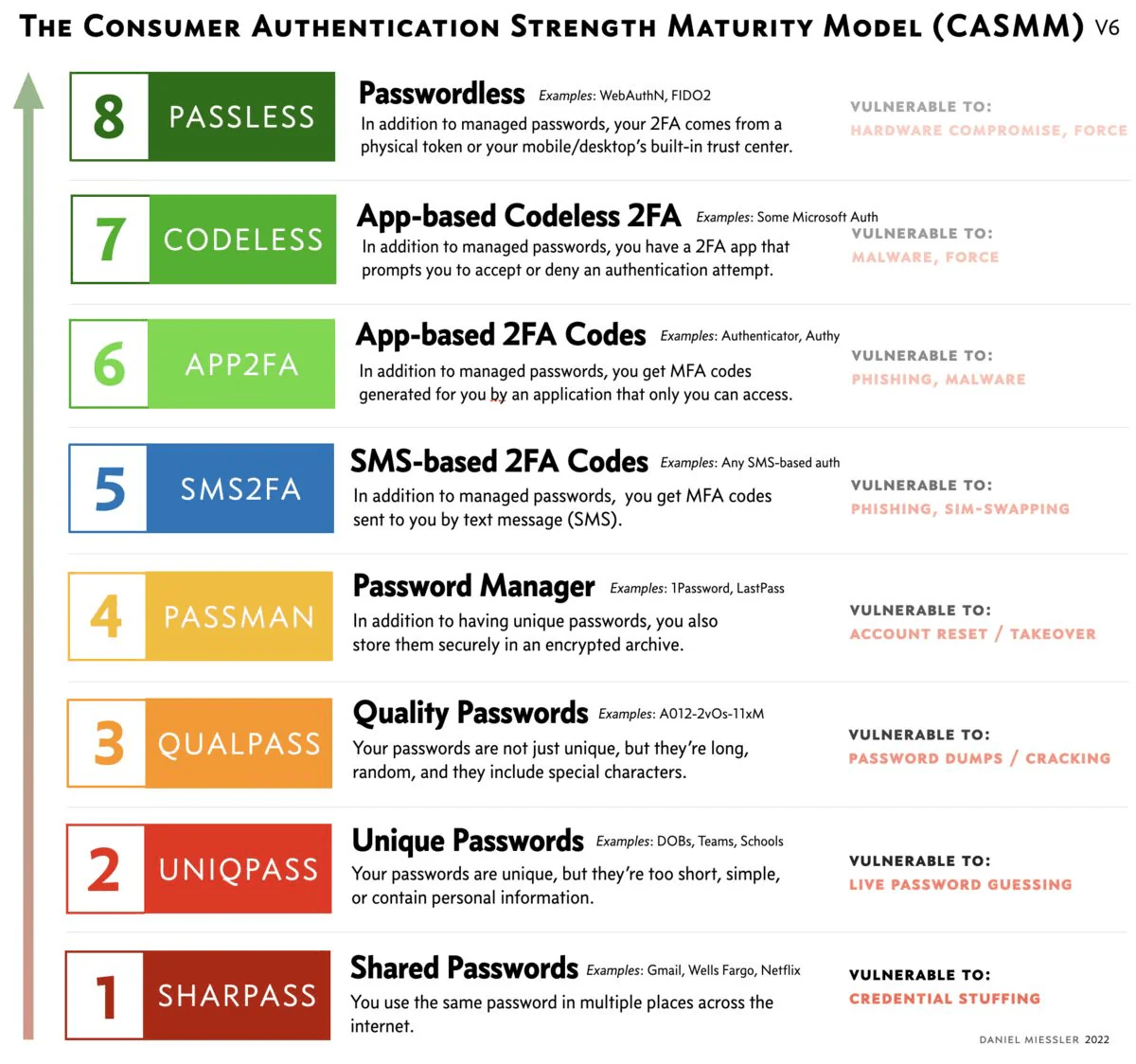
1. Weak password requirements
Having no or minimal controls over the quality of users' passwords.
- >Very short or blank
- >Common dictionary words or names
- >Password is the same as the username
- >Use of default password
- >Missing or ineffective MFA
2. Improper restriction of authentication attempts
Application permits brute force or other automated attacks.
- >Login page
- >OTP / MFA page
- >Change password page
3. Verbose error message
The application outputs a verbose error message that allows for username enumeration.
- >Incorrect username
- >Incorrect password (username existence confirmed)
4. Vulnerable transmission of credentials
The application uses an unencrypted HTTP connection to transmit login credentials.
- >Using HTTP or telnet
5. Insecure forgot password functionality
Design weaknesses in the forgotten password functionality usually make the weakest link, which can be used to attack the application's overall authentication logic.
- >What is your pet's name? → easy to find through recon
6. Defects in multistage login mechanism
Insecure implementation of the MFA function.
How can this be exploited? Change the "account" cookie to the victim's username and compromise the victim's account.
7. Insecure storage of credentials
Uses plain text, encrypted, or weakly hashed password data stores.
| Algorithm | Password | Weakness |
|---|---|---|
| None | Password1! | Is stored in plain text |
| AES256 and Base64 | khwqiy87t76iwabiu32y9u10oiequ== | Just encoded, not any better than plain text |
| MD5 | Ocef1fb10f60529028a71f58e54ed07b | Insecure encryption |
| SHA256 | 1D707811988069CA760826861D6D63AIOE8C3B7F171C444IA6472EA58C11711B | No salting, rainbow table can crack |
Impact of authentication vulnerabilities on CIA
- >Confidentiality — access to other users' data.
- >Integrity — access to update other users' data.
- >Availability — access to delete users and their data.
Can sometimes be chained with other vulnerabilities to gain remote code execution on the host operating system.
How to find and exploit authentication flaws
1. Weak password complexity requirements
- >Review the website for any description of the rules.
- >If self-registration is possible, attempt to register several accounts with different kinds of weak passwords to discover what rules are in place.
- >Very short or blank.
- >Common dictionary words or names.
- >Password is the same as the username.
- >If you control a single account and password change is possible, attempt to change the password to various weak values.
2. Improper restriction of authentication attempts
- >Manually submit several bad login attempts for an account you control.
- >After 10 failed login attempts, if the application does not return a message about account lockout, attempt to log in correctly. If it works, then there is no lockout mechanism.
- >Run a brute force attack to enumerate the valid password.
- >Tools: Hydra, Burp Intruder, etc.
- >If the account is locked out, monitor the requests and responses to determine if the lockout mechanism is insecure.
3. Verbose error message
- >Submit a request with a valid username and an invalid password.
- >Submit a request with an invalid username.
- >Review both responses for any differences in the status code, any redirects, information displayed on the screen, HTML page source, or even the time to process the request.
- >If there is a difference, run a brute force attack to enumerate the list of valid usernames in the application.
4. Vulnerable transmission of credentials
- >Perform a successful login while monitoring all traffic in both directions between the client and server.
- >Look for instances where credentials are submitted in a URL query string or as a cookie, or are transmitted back from the server to the client.
- >Attempt to access the application over HTTP and see if there are any redirections to HTTPS.
5. Insecure forgot password functionality
- >Identify if the application has any forgotten password functionality.
- >If it does, perform a complete walk-through of the forgot password functionality using an account you have control of, while intercepting the requests and responses in a proxy.
- >Review the functionality to determine if it allows for username enumeration or brute-force attacks.
- >If the application generates an email containing a recovery URL, obtain a number of these URLs and attempt to identify any predictable patterns or sensitive information included in the URL. Also check if the URL is long-lived and does not expire.
6. Defects in multistage login mechanism
- >Identify if the application uses a multistage login mechanism.
- >If it does, perform a complete walk-through using an account you have control of, while intercepting the requests and responses in a proxy.
- >Review the functionality to determine if it allows for username enumeration or brute-force attacks.
7. Insecure storage of credentials
- >Review all the application's authentication-related functionality. If you find any instances where the user's password is transmitted to the client (plaintext or obfuscated), this indicates the passwords are being stored insecurely.
- >If you gain remote code execution (RCE) on the server, review the database to determine if the passwords are stored insecurely.
- >Conduct technical interviews with the developers to review how passwords are stored in the backend database.
Which response difference confirms the application leaks valid usernames?
Weak requirements, no limit on , error messages, vulnerable transmission of credentials, insecure functionality, defects in a multistage mechanism, and insecure of credentials.